
Stop Using AI as an Assistant. Start Using It as a Chief of Staff
For six months, I asked Claude to summarize meeting notes and draft emails. I thought I was using AI effectively. I wasn’t.

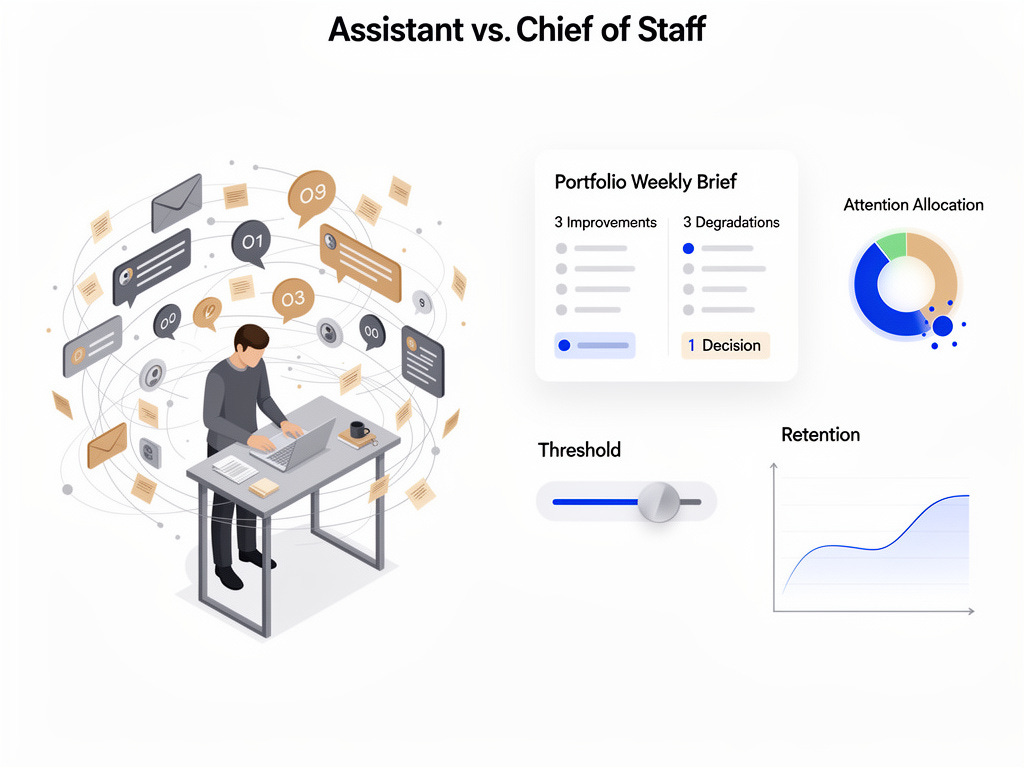
The tell: I was still making every decision myself, just with better inputs. I’d ask for summaries and get summaries. I’d ask for email drafts and get email drafts. Claude was a capable intern. I needed a Chief of Staff. Thesis: the highest ROI use of AI isn’t speed or formatting—it’s judgment delegation under cognitive load.
The difference became clear when I looked at my calendar. I’m managing angel investments requiring quarterly check-ins, Wildfire Labs portfolio companies needing weekly attention, consulting clients on daily deadlines, and real estate projects on multi-year cycles. Each domain operates on a different clock, has different definitions, and requires different intervention thresholds.
Traditional productivity systems collapse under this load because they treat all tasks as equivalent. I don’t need to do more. I need to decide better where to engage.
I rebuilt my AI usage, not as automation, but as judgment delegation. Here are the five shifts that made it work.
What a Chief of Staff Does
An assistant executes tasks you’ve already prioritized. A Chief of Staff answers: “Where does your attention create the highest impact this week?”
That question requires three things that most AI usage overlooks:
Context that continues over weeks and months
Pattern recognition across various time horizons
Explicit models of where intervention matters vs where things can proceed smoothly.
I realized I was treating Claude like the first when I needed the second. The shift required rebuilding my entire information architecture.
The Five Shifts
1. From Summarization to Synthesis
The problem with consulting clients is that they haven’t seen you in a week. In their world, a lot has happened. Without a system, you show up and talk about whatever is urgent that day.
Week one: “We need to fix our onboarding funnel, it’s affecting conversion.” Week two: “Let’s discuss this partnership opportunity.” Week three: “We’re hiring two engineers, need your advice.” Week four: “Remember the onboarding issue? We didn’t get to it.”
The client isn’t being flaky. They’re underwater and defaulting to whatever grabbed their attention that morning. Without the system, I would go with the flow. The strategic priority from two weeks ago would drift. My brief format forces continuity: last discussion points; action items with status; email themes; active goals with progress; and the gap between stated priorities and activity.
Before every meeting, I ask Claude: “Brief me on my next meeting with [NAME].”
What I get back isn’t a summary. It’s a strategic brief: what we discussed last time, assigned action items, their emails since then, active goals, and the gap between stated priorities and actual activity.
When the client wants to spend thirty minutes on a new idea, I can say: “Let’s talk about it. Three weeks ago you said fixing onboarding was crucial for Q1. I see emails about partnership conversations but nothing about onboarding. What happened?”
I’m creating strategic continuity under tactical pressure.
2. From Task Tracking to Narrative Memory
I meet with some portfolio companies weekly and others quarterly. The details are in Read.ai transcripts and email threads. I don’t prepare enough beforehand to remember the context.
The failure mode: I showed up to a quarterly meeting with a vague recollection that “things are going okay.” Then, we did a standard roadmap review. I overlooked what mattered.
Now the system maintains narrative memory. Before a quarterly meeting, Claude pulls every communication since the last check-in and answers: What changed? What assumptions were invalidated? Where is momentum compounding? Where is silent drift occurring? The “memory” lives in my Notion databases plus meeting/email transcripts; the brief is a query over that collection, not a fresh summary.
This caught a retention problem I would have missed for another quarter. The founder’s weekly updates focused on new customer wins and pipeline growth. Everything felt positive. When I asked Claude to prep the quarterly brief, it flagged something: the company mentioned hiring challenges in two emails, their velocity metric had dropped twenty percent in eight weeks, and they hadn’t hit a milestone in forty-five days.
Nothing was urgent on the surface. They were at an impasse.
I came to the meeting asking about team capacity instead of celebrating new logos. The founder admitted they’d been underwater but didn’t want to “bother me” between quarters. We restructured the next quarter around two contract engineers instead of hiring full-time. They shipped their delayed feature six weeks later instead of four months at their current pace.
The system remembers context I would have to manually reconstruct.
3. From Activity Metrics to Attention Economics
ChartMogul changed how this works. It’s a SaaS analytics tool that tracks MRR, churn, retention, and cohorts. It’s the quantitative foundation that makes attention allocation real.
One portfolio company was sending updates about new customer wins. The pipeline looked healthy. Everyone was optimistic. The qualitative signal was “we’re growing.”
ChartMogul told a different story. MRR growth was slower than expected given new bookings. Churn rate crept from four to seven percent over three months. They added twenty thousand in MRR monthly but lost twelve thousand. Net growth: eight thousand. The bucket had a leak.
Without the system, I’d see “new customers” in updates and “MRR up” in dashboards and think everything was fine. The churn problem would stay hidden until it became a crisis.
Claude flagged the brief with ChartMogul feeding into it. He said: “MRR growth below target despite strong sales. Churn increased seventy-five percent over Q4.”
At the next meeting, I asked about retention—not the deals we had just closed. The conversation shifted from “how do we accelerate sales” to “why are customers leaving and how do we address the issue before scaling further?”
The system doesn’t explain why customers are churning—that requires investigation. But it surfaces that retention is the problem when qualitative signals would have hidden it for another quarter. It flags where there’s an issue. You still have to figure out why it’s happening.
You’re not tracking activity. Instead, you’re mapping quantitative health metrics onto qualitative context and asking: where does intervention matter? My default “signals that matter” for SaaS: MRR delta vs target, churn and net revenue retention trends, activation-to-value time, and feature adoption for key initiatives.
4. From Reactive to Managed
This is the shift from operator to governor.
Before, I responded to whoever needed me most that week. After, I set intervention thresholds based on ChartMogul metrics and narrative signals.I calibrate them to historical variance and runway: patterns that exceed normal variation or change cash-out dates trigger involvement; everything else coasts.
For portfolio companies, I engage when MRR drops 15% across two periods, when churn accelerates above threshold, or when they miss two weekly updates in a row. Otherwise, I let it run its course.
That sounds cold until you realize the alternative is constant low-grade involvement that doesn’t help. The founder sends updates. I skim them. I feel informed. Nothing changes.
Governed intervention means paying deep attention to the right things at the right time, not superficial attention to everything all the time.
One company had flat MRR for six weeks. Normally, I’d schedule a strategy call. Their burn rate was fine, they were mid-product cycle, and the founder was sending detailed weekly updates showing they knew the next steps. The cost of my involvement was three hours of prep and conversation to tell them what they already knew. The upside was marginal validation. The cost of neglect was minimal until they missed their next milestone.
I set a threshold and moved on. That freed up twelve hours that month for a consulting client launching a product where my attention mattered.
5. From Notifications to Briefings
Most productivity systems send notifications for due tasks, unread emails, and upcoming meetings.
I need to know what improved, what degraded, what needs a decision.
I run two brief types now: Entity-level briefs before every meeting (the format I described in Shift 1) and Portfolio-level briefs weekly.
The weekly brief has a specific structure:
This week, there are three improvements in the portfolio.
Three things that declined.
I will make one decision in the next two weeks.
Attention allocation: where my time went versus where leverage was (e.g., 60% consulting, 25% portfolio A, 15% admin; hotspots were retention at A, launch runway at B)
This necessitates system-level prioritization. Claude can’t dump everything that happened; it has to evaluate what matters.
The entity brief does the same thing at the meeting level. It includes last meeting’s discussion points, assigned action items with completion status, email themes since then, and active goals with progress indicators. Most importantly, it focuses for this meeting on the difference between what they said mattered and what happened.
That format creates accountability without being confrontational. I’m not saying “you failed.” I’m saying “we decided X was important; let’s discuss its status.”
What This Requires
The challenging aspect isn’t the tools. It’s establishing your canonical source of truth.
I use Notion as the spine. The core databases are: people and entities, objectives with success criteria, initiatives with risk levels, important signals, decisions made and why. This isn’t superficial productivity. It’s organizational memory.
The system only works if this layer is current. You have to maintain it, but most people fail.
I learned this the hard way. I got busy and didn’t update objectives for a portfolio company for six weeks. When I asked Claude for a brief, it told me they’d made “progress on Q4 objectives,” which were from October. It was January. They’d pivoted in November and I’d forgotten to update Notion.
The brief was technically accurate but misleading. I wasted the first fifteen minutes of our meeting on outdated priorities.
The fix: I instituted a monthly routine. Each month, in the first week, I spend thirty minutes updating objectives across all entities. When an objective completes or the timeline shifts, I update it that day. On privacy and governance: I scope access to least-necessary fields, avoid piping sensitive PII, and keep audit logs of system interactions. The brief is only as trustworthy as your guardrails.
Skip it and you’ll get incorrect summaries. The AI is only as good as your canonical truth.
The Leverage Unlock
What became possible: I can evaluate eight portfolio companies in forty-five minutes instead of three hours because the system pre-identifies what needs my attention.
I catch silent drift situations weeks earlier because briefings flag momentum changes I wouldn’t notice in individual updates.
I attend consulting meetings with strategic continuity instead of reacting to the client’s agenda.
The real shift isn’t technical. It’s realizing AI’s highest value isn’t speed; it’s judgment enhancement under cognitive load.
I’m delegating the work of maintaining context across entities that operate on different clocks with different definitions of progress. That’s the difference between an assistant and a Chief of Staff.
If You Want to Construct This
Start with one domain, not your whole portfolio. Pick your highest-frequency, highest-context-switching area. First, build the briefing format—what questions need answering before a meeting? Then work backward to the required data.
The main elements:
Notion databases for people, objectives, initiatives, signals.
If you’re working with SaaS companies, use ChartMogul for quantitative health.
Granola or Read.ai for meeting and email context?
Claude with MCP access to pull it together (Model Context Protocol: lets the model securely pull from your tools and databases). Week 1 MVP: define a one-page entity brief; wire it to a single client; track three “signals that matter”; run one weekly portfolio brief; and set one intervention threshold. Add complexity only after the brief consistently influences your next meeting’s agenda.
I’ve packaged the Notion schema, my prompt templates, and the weekly operating ritual into a Chief of Staff template. It’s free—I want to see what you create with it.
The system works, but only if you’re willing to pay the maintenance cost. The maintenance cost is thirty minutes weekly to keep your canonical truth current. Skip that and the whole thing breaks down into expensive summarization.
Build it right and you gain more than productivity. You gain judgment delegation at portfolio scale.
_____________
Did this post resonate with you? If you found value in these insights, let us know! Hit the 'like' button or share your thoughts in the comments. Your feedback not only motivates us but also helps shape future content. Together, we can build a community that empowers entrepreneurs to thrive. What was your biggest takeaway? We'd love to hear from you!
Interested in taking your startup to the next level? Wildfire Labs is looking for innovative founders like you! Don't miss out on the opportunity to accelerate your business with expert mentorship and resources. Apply now at Wildfire Labs Accelerator https://wildfirelabs.io/apply and ignite your startup's potential. We can't wait to see what you'll achieve!
I really enjoyed reading your post.
By any chance, where can I find resources like the Notion schema?
MR.TODD in DISRUPTIVE post solves The COMPLEXITY of using AI—by guiding us to Stop Using AI as an Assistant. Start Using It as a Chief of Staff.
MR.TODD is The ONLY ADVISOR who gives us this EXCELLENT “CoS”AI Framework.
MR.TODD is right—AI can contribute meaningfully, but only if we build context and scaffolding so agents can navigate safely. Otherwise we get fragile changes, broken builds, and endless back-and-forth.
MR.TODD post covers the potential scope of the role, the range of levels,The USP of AI as “CoS” can come in at, and has INVENTED a framework (with his personal experience)and reading the post , I’m now ready to kick off the AI as “CoS”.
Unlike a chatbot that simply responds to a single query, AI as “CoS” can be coordinated by an orchestrator that plans tasks, uses external tools, and then sequences steps to accomplish a goal as Explained by MR.TODD—What an AI “CoS” does can be as complex or simple as I might need it to be.
I’m GRATEFUL to MR.TODD for giving FREE the packaged the Notion schema,MR.TODD’s own prompt templates, and the weekly operating ritual into a Chief of Staff template.
Sir,I’m excited to create with yr AI CoS Package !